
Fall Line: freeride snowboard game
A racing game Nipale AI built with Claude Opus 5.5. Copy the exact prompt free.
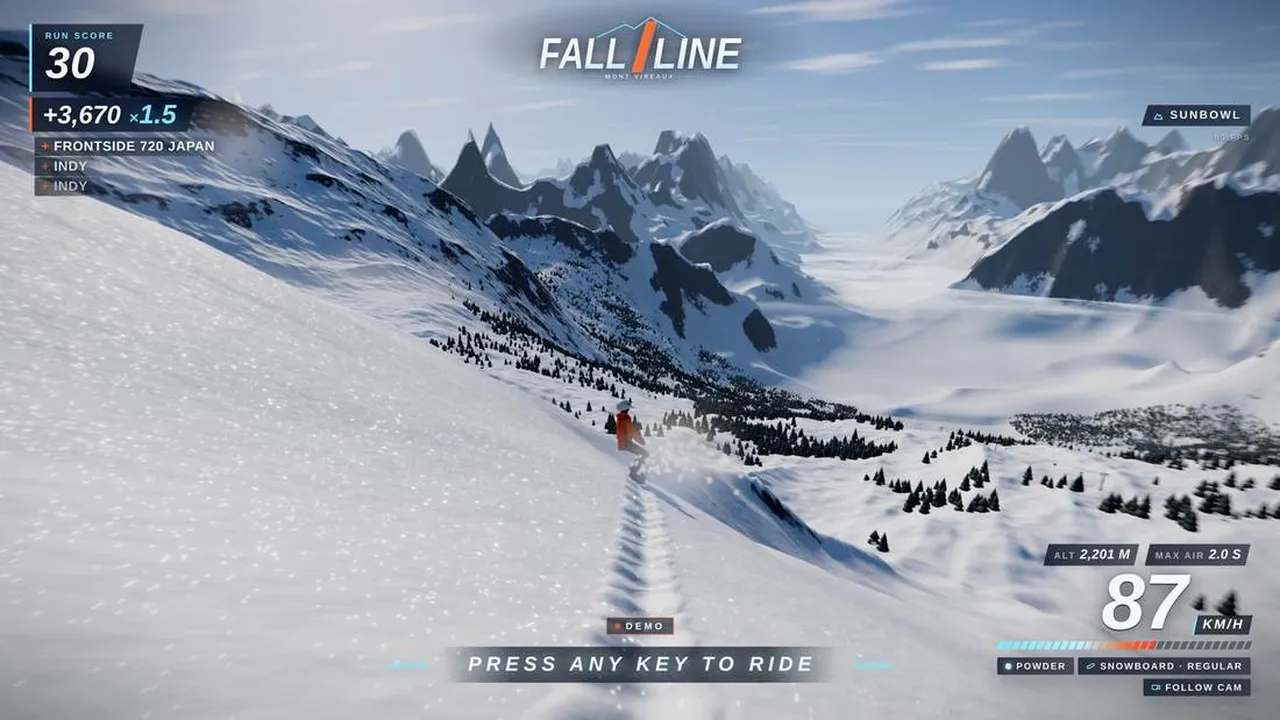
Nipale AI built this with Claude Opus 5.5 and shared the full prompt on GitHub; it is quoted below word for word. Each build got one detailed brief and a time budget. Claude Opus 5.5 then worked alone in Claude Code: planning, writing code, taking its own screenshots, fixing what it saw. Nobody answered questions, nobody touched the code. All four stopped on their own before the budget ran out. Ran alone for 339 minutes at xhigh effort.
The prompt
BRIEF: FREERIDE MOUNTAIN - LONG AUTONOMOUS BUILD

You are a senior game developer and technical artist, working alone and
fully autonomously for a long session in this workspace. Nobody will answer
questions: make every decision yourself and write it down. This brief is a
benchmark. Your result will be shown on video side by side with other runs
of exactly this brief, and a human will play it. The goal is the most
impressive game you are capable of building, not "something that runs
without errors". Everything below is a floor, not a ceiling: wherever you
can go further, go further, and add whatever else makes it feel like the
full game. Never cut scope to play it safe.

====================================================================
1. THE MISSION
====================================================================
Recreate the gameplay of Ubisoft's Steep (2016) as a browser game, as
faithfully and as ultra-accurately as you can: one huge alpine mountain,
drop in wherever you want, ride any line on skis or on a snowboard, throw
tricks off anything, and get judged on every run. Real physics, real snow,
the complete trick vocabulary and a deep scoring system. It must feel like
a shipped game from a professional studio, not a tech demo.

If you know the original, match its feel: how speed builds on the
mountain, how carving and powder feel, how tricks are controlled, the
cameras, the event and medal structure. Where your memory is unsure,
design it yourself to the same standard. Do not spend time trying to
remember; build.

Recreate the gameplay only. Do not use the name "Steep", the Ubisoft name
or logo, or any original art, audio, music, UI design, text, characters or
location names from the game. Invent your own title and visual identity.

====================================================================
2. PHYSICS - THE HEART OF THE GAME
====================================================================
This is where the game is won or lost. A viewer must be able to see the
physics working.
- Speed comes only from the mountain: gravity along the real local slope,
  snow friction that depends on the snow type, air drag that depends on the
  rider's stance (tucked vs. upright). No scripted speed, no artificial
  speed caps.
- Board and skis touch the terrain along their length, not at one point:
  sample the surface under nose, waist and tail and follow the real
  terrain normal. No floating, no sinking through the ground, no jitter on
  steep or uneven terrain.
- A real edge model. Carving vs. skidding follows from edge angle, speed
  and lean. The turn radius follows from edge angle and sidecut. Skidding
  scrubs speed and throws snow, carving holds speed, catching an edge at
  speed throws the rider.
- Snowboard: regular and goofy stance, toeside and heelside edges, switch
  riding. Skis: parallel carving, skidded turns, switch riding. Both are
  selectable and each has a clearly different feel.
- Deep powder: board or skis sink and float depending on speed and weight
  distribution; lose too much speed and you bog down. Ice: little grip,
  long slides, chatter. Groomed piste: fast and predictable. Wind-packed
  crust: grippy but rough.
- Jumps: charge the pop, time the release on the lip, fly a true
  ballistic arc from the take-off velocity. Spins and flips follow the
  angular momentum set at take-off plus limited in-air control, the way the
  original feels. Terrain launches the rider naturally (lips, rollers,
  cornices, cliffs, pillows); no scripted jump zones.
- Landings are judged by physics: board or ski angle vs. slope and vs.
  direction of travel, rotation completed or not, landing in the steep
  transition vs. on the flat. The outcome ranges from a perfect stomp
  through a sketchy recovery to a full crash.
- Crashes: a physically simulated ragdoll (jointed body with joint
  limits) that tumbles believably down the slope, hits trees and rocks,
  slides to a stop in the snow, then a quick respawn.
- Collisions with trees, rocks, huts and every solid object on the
  mountain.
- Fixed-timestep simulation (for example 120 Hz), decoupled from rendering
  and interpolated, so the game behaves identically at any frame rate.
- Tune with numbers, not only by feel: log speeds, air times, jump heights
  and turn radii, compare them with what real riders achieve, and record
  these checks in NOTES.md.

====================================================================
3. SNOW - IT MUST LOOK, SOUND AND BEHAVE LIKE SNOW
====================================================================
- Several snow types across the mountain: deep powder, groomed piste,
  wind-packed crust, ice, and anything else you consider essential. Each
  has its own grip, speed, spray, look and sound. The player feels and
  sees the difference.
- Persistent tracks: trenches in powder with real depth, carve lines on the
  piste, landing craters, crash marks. They stay for the whole session. Use
  a deformation technique that scales, for example world-space trail
  textures that displace the surface and feed its normals and shading.
- Carves throw spray scaled by speed and edge pressure. Landings and
  crashes explode into powder clouds. Spindrift blows off the ridges. Snow
  falls where the weather calls for it.
- Snow shading that reads as real snow up close and from far away:
  sparkling glints in the sun, soft blue light in shadows and inside track
  walls, visible surface texture. Never a flat white surface.
- Procedural audio in Web Audio, driven by the physics (speed, edge
  pressure, snow type): powder hiss, ice scrape, carve crunch, landing
  thud, crash, wind that rises with speed.

====================================================================
4. TRICKS - THE COMPLETE VOCABULARY
====================================================================
- Spins from 180 to 1440 and beyond, frontside and backside, in both
  directions. Front and back flips. Off-axis corks, rodeos and mistys.
  Doubles where the air time allows.
- Grabs, held and tweaked: indy, mute, melon, stalefish, method, nose,
  tail, japan, roast beef, and the ski grabs (safety, mute, japan, tail,
  critical, blunt and more). Hold time and tweak count.
- Grinds, slides and presses on rails, boxes and anything grindable on the
  mountain. Butters and presses on the snow. Switch take-offs and landings.
- Combos chained across features and across the ground between them.
- Every trick is performed by the rider's 3D body: visible rotation axes,
  hands reaching the board or the skis, tweaks, a real posture on rails. A
  trick label without the matching motion does not count.
- The mountain offers places for all of it: natural wind lips, cliff
  drops, pillow lines, rollers, cornices, plus built kickers, rails and
  boxes.

====================================================================
5. SCORING - A REAL JUDGING SYSTEM
====================================================================
- Every trick is recognized and named live, the way a judge or a
  commentator would call it (for example "Switch Backside Double Cork 1080
  Mute").
- Points follow difficulty: rotation, flips and off-axis rotation, grab
  hold time and tweak, switch, amplitude, and landing quality (for example
  Perfect / Clean / Sketchy). A crash wipes the unbanked combo.
- Combos build a multiplier. Repeating the same trick is worth less each
  time. Variety pays.
- A run score that rewards riding the mountain well: speed, air time, big
  drops, long clean riding without a crash, style.
- Events placed on the mountain in the spirit of the original: trick
  contests scored in points, races against the clock through checkpoints,
  freeride runs scored by the judging system. Each event has bronze,
  silver and gold targets and a results screen that breaks the score down,
  so the player understands exactly why.
- Personal bests per event, saved in localStorage.
- The judging logic is documented in NOTES.md: formulas, weights and why.

====================================================================
6. THE MOUNTAIN
====================================================================
- One large, continuous alpine mountain that can be ridden from the
  summit to the valley in one long run: ridges, couloirs, cliff bands, open
  bowls, forests and glades, groomed pistes, and an area with built
  features.
- Several start points spread over the mountain.
- Long draw distance: the whole massif and the surrounding peaks stay
  visible to the horizon. Use level of detail instead of shrinking the
  world.
- Every area is worth riding: lines, features, places to go big.
- Light and atmosphere that make the snow look its best: pick the time of
  day and the weather that show your mountain best.

====================================================================
7. RIDER, CAMERAS, HUD, CONTROLS
====================================================================
- A fully articulated 3D rider (body, clothing, helmet and goggles, board
  or skis) animated from the physics state: crouch, lean into carves, arms
  balancing, compression on landings, real grabs, ragdoll in a crash. No
  capsule or box as the final rider.
- A smooth third-person follow camera with the feel of an action-sports
  broadcast, a first-person helmet cam, and cinematic angles on big airs.
- A clean, modern HUD with its own identity: trick string, combo,
  multiplier, speed, air time, landing verdict, run score, event timer.
- Keyboard and gamepad (Gamepad API). The active controls are visible on
  screen.

====================================================================
8. DEMO MODE AND API - MANDATORY, THE RECORDING DEPENDS ON IT
====================================================================
- On load, with no input at all, an AI rider using the same physics rides
  a full run from high on the mountain: carving, powder, a jump line with
  real tricks and landings, the live judging HUD and cinematic cameras.
  No click-to-start screen before it. Any key or gamepad button hands
  control to the player; after 30 seconds without input the demo resumes.
- Expose window.GAME from page load:
    GAME.state()          -> plain object with finite values only:
                             { speedKmh, airborne, trick, combo,
                               multiplier, runScore, snowType,
                               discipline, mode, camera, fps }
    GAME.demo()           -> start the demo
    GAME.play(startIndex, discipline)
                          -> start a player run, discipline is
                             'snowboard' or 'ski'
    GAME.setCamera(name)  -> 'follow' | 'helmet' | 'cinematic'

====================================================================
9. YOUR TOOLBOX
====================================================================
- Read ./TOOLBOX.md first. It lists exactly what is installed on this
  machine, with versions and paths. Nothing else is available.
- There is no internet access. npm install works only for the packages in
  the local offline cache listed in TOOLBOX.md.
- Available and recommended. Use what helps, ignore what does not, and
  write your own wherever a library fights you:
  three.js (WebGL2 renderer and addons), postprocessing (bloom, SMAA, tone
  mapping, depth of field), three-mesh-bvh (fast raycasts against large
  meshes), @dimforge/rapier3d-compat (rigid bodies, joints, ragdolls,
  colliders), cannon-es (alternative physics), simplex-noise (terrain and
  procedural textures), lil-gui (tuning panel during development),
  esbuild and vite (bundling), Playwright with Chromium (drive the game,
  screenshots, video clips, console logs, fps), Python 3 with numpy and
  Pillow (analyze screenshots and audio), ffmpeg, git.
- If TOOLBOX.md lists Blender (headless, bpy), you may script it to model,
  rig and export assets as glTF (for example the rider, trees, huts).
- Everything the player sees and hears is made by you in this session:
  code, shaders, procedural geometry and textures, synthesized audio, or
  assets you produce with the listed tools.
- If your harness offers subagents, you may use them.

====================================================================
10. HOW TO WORK
====================================================================
- Time: your deadline is in ./DEADLINE (local time). Check `date`
  regularly. Use the whole budget. When you think you are finished, you
  are not: run the review loop again, find the weakest part of the game,
  improve it, measure again. Stop only when the deadline is close.
- The state of ./dist at the deadline is what gets judged, so it must
  always be runnable. Commit to git after every working milestone. If an
  experiment breaks the build, revert it.
- Your context will be compacted during this long run. Files are your
  memory. Keep DESIGN.md (architecture, systems, decisions, formulas) and
  PROGRESS.md (done, in progress, next, known problems) current, and re-read
  both after every compaction and before every new milestone.
- Order of work:
  1. Plan briefly: read TOOLBOX.md, write DESIGN.md with architecture,
     systems, milestones and the biggest risks.
  2. Vertical slice early: terrain, rider on skis and on a board with the
     core physics, follow camera, snow shading, ./dist and start.sh
     working. Commit.
  3. Breadth: bring every section of this brief to a working first version
     before going deep on any single one.
  4. Depth and polish: physics feel, snow, tricks and animation, judging,
     events, mountain detail, light, audio, HUD, demo rider.
  5. Review loop until the deadline.
- The review loop, repeated many times:
  - Drive the game with Playwright in Chromium: let the demo run, start
    player runs with GAME.play, switch cameras, and capture screenshots at
    fixed moments (carving in powder, take-off, mid-air trick, landing,
    crash, results screen, wide shot of the mountain) plus short clips.
  - If you can view images, look at every screenshot like a demanding art
    director and a pro rider would. Whether or not you can, also measure:
    fraction of clipped white pixels (snow must never blow out into flat
    white), fraction of near-black pixels, the luminance histogram of the
    snow, frame-to-frame difference (proves motion), console errors, fps
    from GAME.state(), your physics logs.
  - Write down what is weakest, fix it, measure again, commit.
- Performance is part of quality: target a steady 60 fps at 1920x1080 on
  the recording machine, one high-end desktop GPU (RTX 5090 class), and
  spend that headroom on what the player sees. Use level of detail for the
  terrain, instancing for trees and rocks, GPU particles, frustum culling,
  sensible shadow cascades. Report what you actually measure, not what you
  hope.
- Do not ask questions. Do not touch anything outside this workspace.

====================================================================
11. QUALITY BAR
====================================================================
- The three-second test: any random frame of the demo reads at once as a
  current-generation winter-sports game: striking light on real snow, a
  believable rider, a mountain with grandeur.
- The physics must be visible: a viewer sees the difference between powder
  and ice, a carve and a skid, a stomp and a crash.
- No placeholder art in the final build: no untextured grey shapes, no
  default materials, no programmer-art rider.
- Zero console errors. No NaN, no rider stuck in the terrain, no camera
  inside geometry.
- All user-facing text (UI, HUD, titles, hints) in ENGLISH.

====================================================================
12. DELIVERABLE
====================================================================
- ./dist/ : the built game (index.html plus assets), runs offline.
- ./start.sh : serves ./dist at http://localhost:8080 without any network
  access and prints the URL.
- README.md : title, how to start, full controls (keyboard and gamepad).
- NOTES.md : an honest report. What you built, how physics and judging
  work, what you measured (fps, load time, build size), which tools and
  libraries you used for what, what you threw away and why, what is still
  weak, what you would do with more time. A weakness written down is worth
  more than a clean claim.
- DESIGN.md and PROGRESS.md up to date.
- Final message: DONE, the absolute path of dist/index.html, and the fps
  you measured.

---
WORKBENCH FOR THIS RUN (identical for every model; it replaces any workbench, helper commands, /toolbox paths or offline caches named above):
- You work on a Mac inside this folder. Work only inside this folder.
- The bench-* helper commands and /toolbox do not exist here. You have Node.js with npm (online), Python 3 and a shell. You may install npm packages, including Playwright for your own screenshots.
- Serve your result on port 8141. Other runs use other ports.
- Your time budget is 6 hours and ends at 10:54 local time. Check the time with the date command.
- No image, music or video generation models. Nobody will answer questions.
Prompt by Nipale AI, quoted word for word from their GitHub repository. Model as stated by the creator; your result will differ.
What’s inside
- Copy the prompt below, or download it as a SKILL.md
- Paste it into Claude Opus 5.5, ideally in Claude Code so it can write, run and test the game
- Swap in your own theme, characters or rules where the prompt names theirs
- Play it, then ask for fixes and polish in plain words
What you’ll bring
- Claude Opus 5.5 (Claude Code, or a Claude chat for single-file HTML games)
- A browser to play the result
- Your own twist on the idea, if you want one
What you’ll get
- A playable browser game in the spirit of the one above, written by Claude
- The code, which you can keep editing
Perfect for
- Anyone who wants to make a game without coding
- Developers testing what Opus 5.5 can build
- Teachers and parents making a game with kids
Also found as
opus 5.5 game prompt · claude game prompt · one shot game prompt · racing · fall line: freeride snowboard game
Questions
What is Fall Line: freeride snowboard game?
Fall Line: freeride snowboard game is a racing game that Nipale AI built with Claude Opus 5.5. This page quotes the prompt they shared, word for word.
Who made it, and where was the prompt shared?
Nipale AI made it and shared the prompt on GitHub: https://github.com/Nipale-ai/opus-5-5-overnight-builds/blob/main/briefs/fall-line-prompt-as-sent.md. You can find more from them at https://github.com/Nipale-ai/opus-5-5-overnight-builds.
How do I use the prompt?
1. Copy the prompt below, or download it as a SKILL.md. 2. Paste it into Claude Opus 5.5, ideally in Claude Code so it can write, run and test the game. 3. Swap in your own theme, characters or rules where the prompt names theirs. 4. Play it, then ask for fixes and polish in plain words.
Is it free?
Yes. Copying the prompt and downloading the SKILL.md costs nothing on Omo. You run it with your own access to Claude Opus 5.5.
The video and the prompt belong to Nipale AI. Omo lists them free, with credit and a link to the original post. Creators can ask us to remove a listing at omo.space/support.