
Candy Breaker: SVG brick breaker
An arcade game OpenVGLab built with Claude Opus 5.5. Copy the exact prompt free.
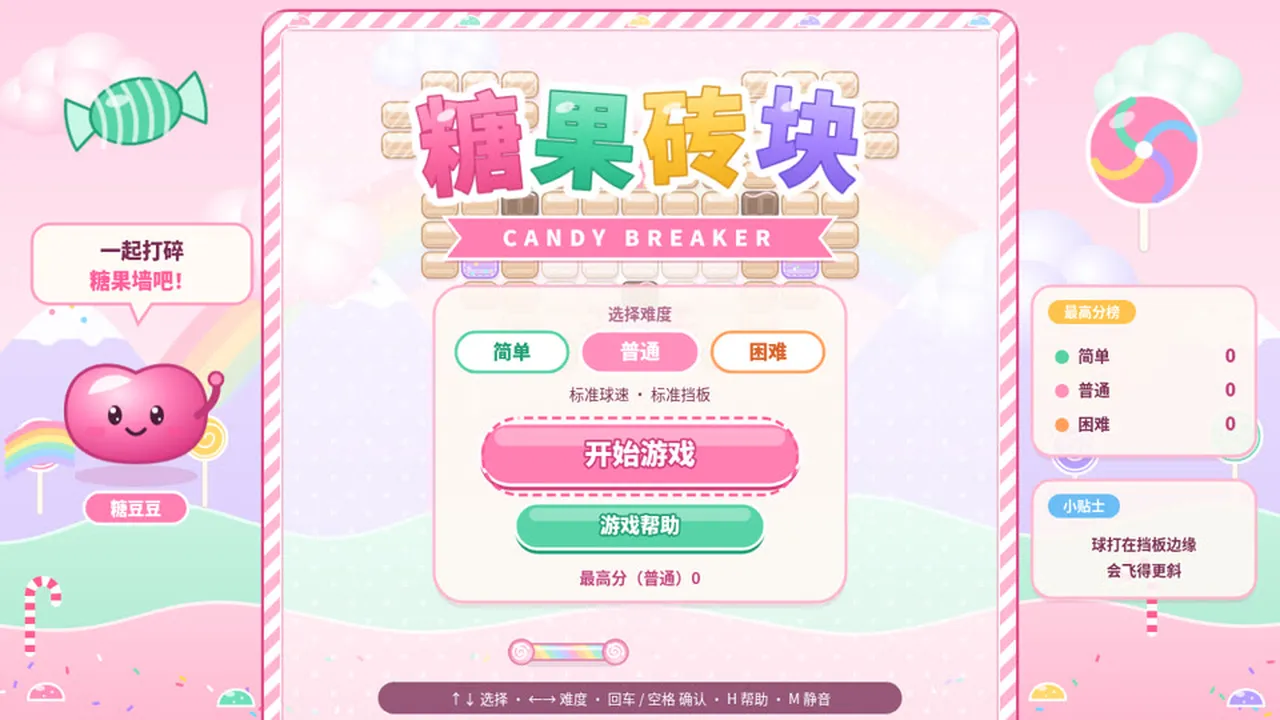
OpenVGLab built this with Claude Opus 5.5 and shared the full prompt on GitHub; it is quoted below word for word. A candy-themed brick breaker: bounce a rainbow lollipop paddle, chain popping-candy explosions and multi-ball fireballs through 8 candy-pattern levels. A single 130 KB SVG. This prompt is in Chinese. Paste it as written; Claude follows it in any language. Add "Make all in-game text English" if you want English menus. Prompt in Chinese. 打砖块 / 街机休闲, inspired by 打砖块: 用会弹的彩虹棒棒糖挡板把拖着彩虹尾巴的糖豆打回去,跳跳糖连环爆炸、多球火球齐飞,8 个糖果图案关卡一路吃到生日蛋糕 粉色、薄荷绿、奶油黄的糖果果冻风,Q 弹半透明软糖砖块配棉花糖云和糖果山.A single 130 KB SVG.
The prompt
你负责独立完成一款浏览器小游戏《糖果砖块 CANDY BREAKER》:糖果果冻风的打砖块,玩法借鉴《打砖块》,角色、名字和美术全部原创。

【交付】
- 只交付一个自包含文件 candy-breaker.svg,根元素为 <svg xmlns="http://www.w3.org/2000/svg" viewBox="0 0 1280 720" width="100%" height="100%" preserveAspectRatio="xMidYMid meet">,窗口缩放时 16:9 画面完整居中。
- 画面、界面、游戏逻辑(内联脚本)和音效全部写在这一个文件里,不引用任何外部图片、字体、脚本或网络资源,浏览器直接打开就能玩。文件必须是合法的 UTF-8 XML。
- 界面文字用中文,标题配英文副标题。音效和背景音乐用 Web Audio 实时合成,第一次按键或点击后开始发声,M 键静音。
- 只借鉴玩法,不使用原作的角色、名字或标志性素材。

【玩法】
- 用挡板把小球弹回去,打碎所有可破坏的砖块就过关;小球碰到挡板的位置决定反弹角度,越靠边角度越斜。
- 砖块种类:普通糖块(1 击);硬糖(2~3 击,每挨一下出现更深的裂纹);巧克力块(打不碎);跳跳糖(打碎时炸掉周围一圈);礼物糖(打碎后掉落道具)。
- 好道具:加长挡板、多球(分裂成 3 个)、慢速、激光(挡板 8 秒内可发射激光)、黏球(接住球再发射)、火球(穿透砖块);坏道具:缩短挡板、加速。道具从砖块位置落下,用挡板接住才生效。
- 共 8 关,每关砖块排成不同图案(爱心、城堡、棒棒糖、汉堡、小熊……),第 4 关和第 8 关有左右移动的砖块。
- 3 条命,漏球扣命;不碰挡板连续打碎砖块形成连击,连击越高分数倍率越高。
- 难度:简单(球慢、挡板长)、普通、困难(球快、坏道具更多);用 localStorage 记录最高分。

【操作】← → / A D 或鼠标移动挡板;空格 / 鼠标点击 发射小球或激光;P 暂停,H 帮助,M 静音。

【画面】
- 糖果果冻风:粉色、薄荷绿、奶油黄为主的柔和配色;砖块是带高光、半透明的糖块和果冻,被击中时 Q 弹形变,碎掉时迸出糖粒碎屑。
- 背景是缓慢漂浮的棉花糖云和糖果山;挡板是一根有弹性的彩色棒棒糖;小球是一颗会拖出彩虹尾迹的糖豆。
- HUD 显示分数、关卡、剩余命数、连击数和当前道具倒计时。

【流程与界面】
- 标题页:难度选择、开始、帮助、最高分,背景里有自动演示的打砖块画面。
- 帮助页:操作说明,以及砖块和道具的图示。
- 每关开始显示关卡名;暂停菜单有继续、重新开始、返回标题;过关结算显示连击奖励和剩余时间奖励;8 关全通显示结局,命用完显示游戏结束,都可以再来一局。

【验收】
在无头 Chrome 里自动试玩:从标题页开局并实际操作一局。要求 0 个 JS 报错、0 个 XML 解析错误、帧率不低于 55 fps;在 1280×720 和 1920×1080 两种分辨率下截图,确认画面完整、文字不溢出。
Prompt by OpenVGLab, quoted word for word from their GitHub repository. Model as stated by the creator; your result will differ.
What’s inside
- Copy the prompt below, or download it as a SKILL.md
- Paste it into Claude Opus 5.5, ideally in Claude Code so it can write, run and test the game
- Swap in your own theme, characters or rules where the prompt names theirs
- Play it, then ask for fixes and polish in plain words
What you’ll bring
- Claude Opus 5.5 (Claude Code, or a Claude chat for single-file HTML games)
- A browser to play the result
- Your own twist on the idea, if you want one
What you’ll get
- A playable browser game in the spirit of the one above, written by Claude
- The code, which you can keep editing
Perfect for
- Anyone who wants to make a game without coding
- Developers testing what Opus 5.5 can build
- Teachers and parents making a game with kids
Also found as
opus 5.5 game prompt · claude game prompt · one shot game prompt · arcade & puzzle · candy breaker: svg brick breaker
Questions
What is Candy Breaker: SVG brick breaker?
Candy Breaker: SVG brick breaker is an arcade game that OpenVGLab built with Claude Opus 5.5. This page quotes the prompt they shared, word for word.
Who made it, and where was the prompt shared?
OpenVGLab made it and shared the prompt on GitHub: https://github.com/OpenVGLab/awesome-opus5.5-frontend-showcases/blob/main/README.en.md. You can find more from them at https://github.com/OpenVGLab/awesome-opus5.5-frontend-showcases.
How do I use the prompt?
1. Copy the prompt below, or download it as a SKILL.md. 2. Paste it into Claude Opus 5.5, ideally in Claude Code so it can write, run and test the game. 3. Swap in your own theme, characters or rules where the prompt names theirs. 4. Play it, then ask for fixes and polish in plain words.
Is it free?
Yes. Copying the prompt and downloading the SKILL.md costs nothing on Omo. You run it with your own access to Claude Opus 5.5.
The video and the prompt belong to OpenVGLab. Omo lists them free, with credit and a link to the original post. Creators can ask us to remove a listing at omo.space/support.